
Research question
Can a remote interview preserve realistic engineering work without asking an untrusted candidate device to police itself?
In a conventional remote interview, the candidate device is both the place where the work runs and the place where the work is observed. The operating system composes the interview window, receives input, manages local processes, and exposes screen capture interfaces. A browser extension, virtual display, local model, or privileged accessibility tool may therefore share the same observation surface as the interviewer.
Host monitoring tries to identify disallowed software from inside this environment. That approach is difficult to generalize because the candidate controls the device and because aggressive monitoring creates privacy and accessibility costs. The alternative studied here is architectural: move execution into a controlled session and reduce the local browser to the narrowest useful role.
The design does not attempt to prove that a person is unaided. It attempts to produce better evidence by controlling where the work runs and where the evidence is collected.
Threat model
The model assumes that the candidate has administrative control of the local device. They may install software, attach virtual displays, run OCR or transcription, and use local AI tools. The network between the client and Qube is untrusted. The cloud control plane, session image, identity system, recorder, and approved collaborators are trusted components.
- Protected asset
- Challenge content, workspace state, decoded session pixels, approved model context, and the synchronized evidence record.
- Primary adversary
- Software on the candidate device attempting to read, copy, or relay information from the live session.
- Security objective
- Limit direct access to session data outside the controlled execution plane and retain attributable evidence inside it.
- Non-goal
- Eliminating cameras, verbal coaching, social engineering, compromised cloud administrators, or every possible side channel.
System design
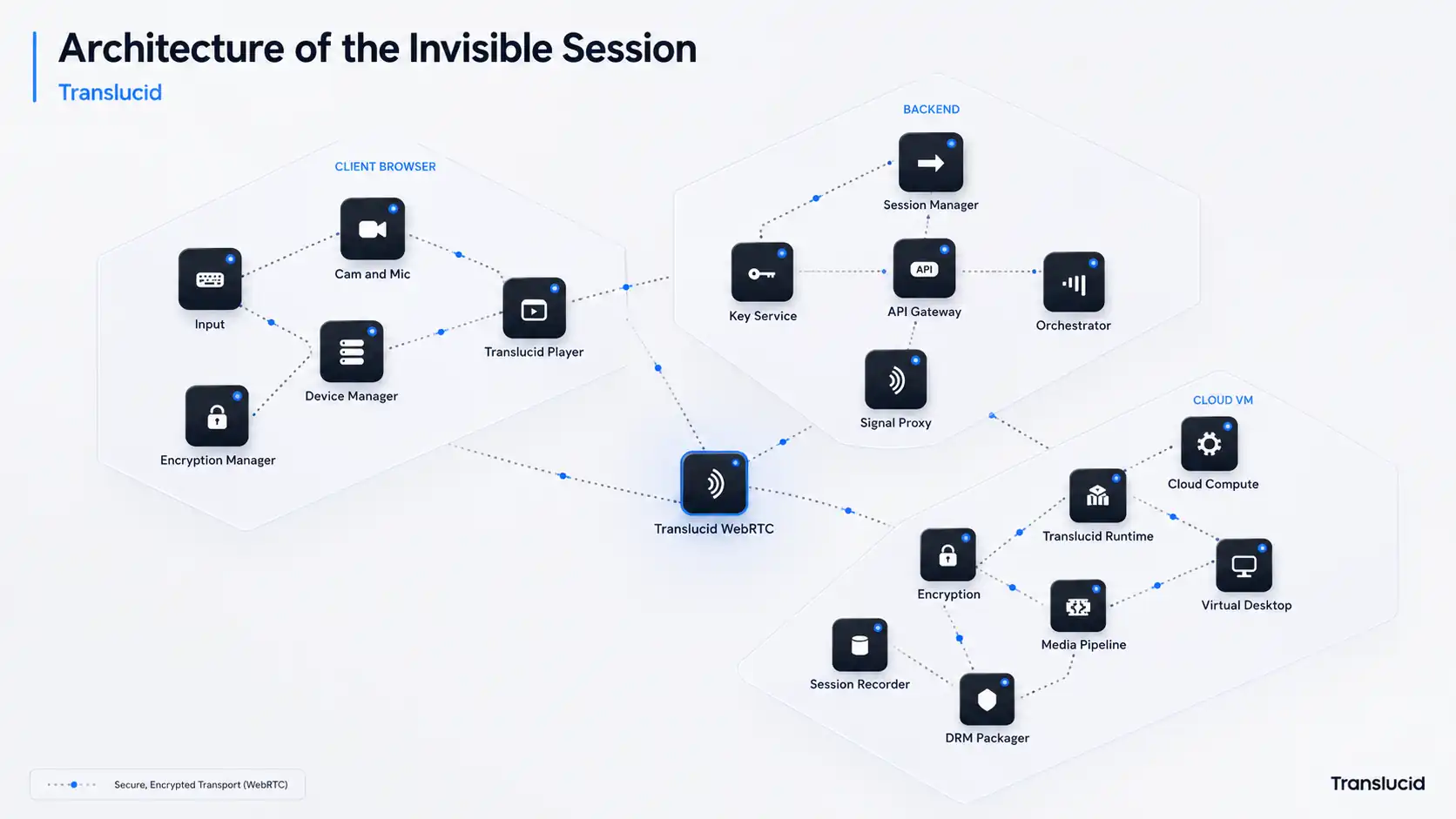
Qube creates an isolated workspace for each interview. The workspace contains the role-specific challenge, development tools, permitted documentation, browser access, and approved agents. The candidate joins through a browser and interacts with the remote workspace. Recruiters and interviewers can join the same session under separate identities and permissions.
This separation changes the location of sensitive state. Source files, terminal history, model context, and intermediate work remain in the cloud session. The candidate device receives a rendered view and sends input events. At the end of the interview, the workspace can be destroyed while the authorized evidence record is retained according to the hiring team's policy.
Provision
A role-specific workspace is created from an approved challenge image. The candidate receives access to the session, not to the underlying production repository.
Execute
The IDE, terminal, browser, permitted agents, and challenge services run inside the isolated workspace. Input is relayed from the browser.
Deliver
The visual session is encoded and delivered through encrypted WebRTC transport. A protected media path can add a second control where the client supports it.
Record
Code changes, commands, approved AI interactions, research activity, and collaborator events are captured inside the execution plane.
Protected delivery path
WebRTC provides the real-time transport layer. Its security architecture requires encrypted media channels and DTLS-SRTP keying for media transport.[1] This protects the session against network interception, but transport encryption alone does not prevent software on the viewing device from requesting decoded pixels after playback.
A protected media integration addresses a different boundary. The W3C Encrypted Media Extensions API lets a browser select a content protection system and mediate license exchange.[2] Widevine is one such system and supports browser playback through a content decryption module.[3] Where the client and policy negotiate a hardware-backed protection level, decoded frames may remain inside a restricted path between the decryption component and display pipeline.
This control must be described conditionally. EME does not itself define a DRM system, and client implementations vary. The correct deployment claim is that a protected path can reduce direct pixel exposure when it is supported and enforced. It is not a universal guarantee that every capture method returns black frames.
Evidence model
Moving execution into the cloud makes the working process observable at its source. The recorder can synchronize code changes, terminal activity, approved AI use, browser research, and collaborator events without inspecting unrelated processes on the candidate's laptop.
The record is evidence for human review, not an automated judgment. It should help an interviewer reconstruct how a result was produced, identify where assistance entered the process, and compare the work against a role-specific rubric.
| Source | Recorded object | Review question |
|---|---|---|
| Code | File changes and repository state | What changed, when it changed, and the resulting artifact |
| Terminal | Commands, output, and exit status | How the candidate investigated, tested, and recovered from failure |
| AI use | Approved prompts and responses | Where assistance entered the process and how the candidate evaluated it |
| Research | In-session browser activity | What the candidate looked up and how outside information affected the work |
| Collaboration | Presence and session annotations | How requirements, questions, and tradeoffs were communicated |
Properties and conditions
The architecture is useful only if each claim is tied to an operating condition. The table below separates the intended property from the requirement that makes the property credible.
Source isolation
Production source code is not placed on the candidate device.
Condition. The challenge must be generated from approved context and provisioned in a separate workspace.
Transport confidentiality
WebRTC media and data channels are encrypted in transit.
Condition. The implementation must use the security requirements defined for WebRTC, including DTLS-SRTP for media.
Reduced pixel exposure
A protected media path can restrict direct access to decoded frames.
Condition. This depends on the browser, device, DRM integration, negotiated security level, and output policy.
Process attribution
Work artifacts can be reviewed with the events that produced them.
Condition. Relevant activity must occur inside the session and the event record must remain complete and synchronized.
Limitations
The design narrows the trust boundary; it does not remove the need for careful challenge design, interviewer judgment, or security testing. The following limits should remain visible in any product or procurement claim.
Optical capture
A camera pointed at the display remains outside the software trust boundary. Watermarking may support attribution, but it does not prevent recording.
Client variability
Protected media capabilities differ across operating systems, browsers, hardware, and policy. A deployment must measure the negotiated protection on each supported client.
Human relay
No media architecture can stop a person outside the camera view from giving verbal guidance. Challenge design and live follow-up remain important.
Side channels
Timing, bitrate, accessibility surfaces, notifications, and misconfigured session services can disclose information even when direct frame access is restricted.
Evidence is not a verdict
The audit trail records activity. It does not determine intent or hiring fitness. Review criteria and final decisions remain with the hiring team.
Validation status
Security claims require device-level testing, adversarial evaluation, and clear compatibility reporting. Architecture alone is not proof of enforcement.
Conclusion
Remote interview integrity is partly a systems problem. Running the interview on a candidate-controlled device places sensitive work and local observation tools on the same host. Qube separates them by running the workspace in an isolated cloud session, delivering a controlled view to the browser, and collecting authorized evidence inside the session.
The strongest version of this design depends on verified client protection, complete in-session instrumentation, and independent adversarial testing. Future work should publish device compatibility, measured capture behavior, latency, event completeness, and failure-mode results. Those measurements will determine where the architecture provides a strong control and where it provides only a useful reduction in risk.
References
- E. Rescorla. WebRTC Security Architecture. RFC 8827, Internet Engineering Task Force, 2021. rfc-editor.org
- W3C Media Working Group. Encrypted Media Extensions. World Wide Web Consortium. w3.org/TR/encrypted-media-2
- Google. Widevine DRM overview. Google for Developers. developers.google.com/widevine